
Cisco ASDM fails to start on Windows 10
Cisco ASDM won't start on Windows 10:

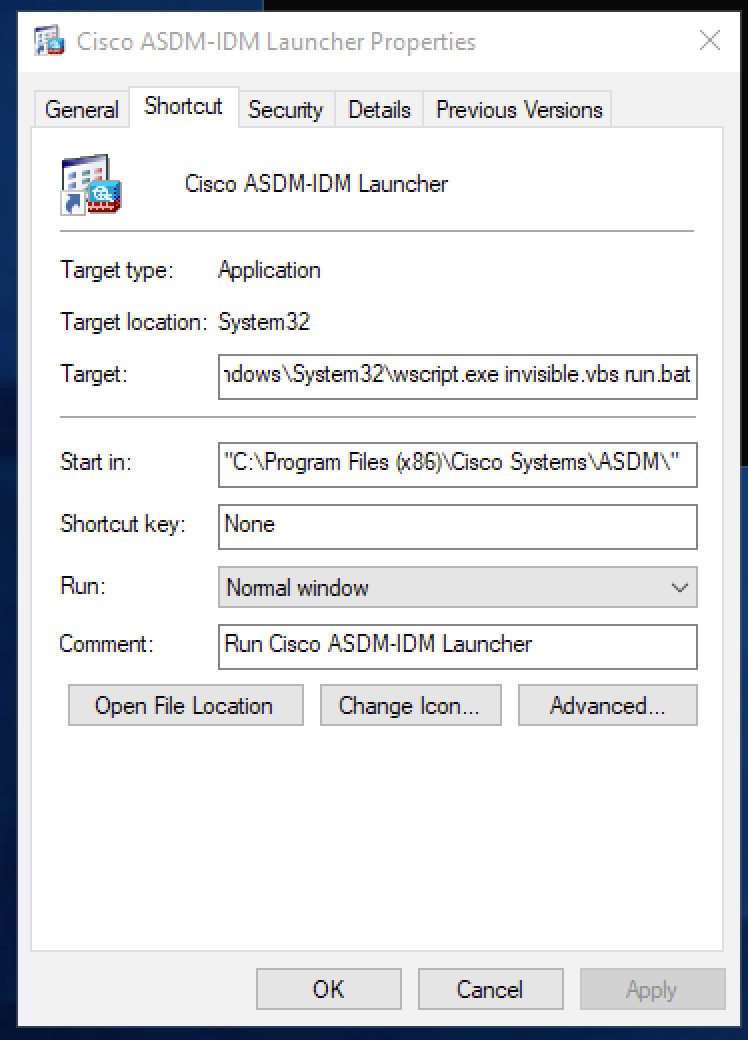
To resolve the issue:
- Right-click on the
ASDMlink on your desktop - Choose
Properties - Under target set it to "
C:\Windows\System32\wscript.exe invisible.vbs run.bat":
Cisco ASDM won't start on Windows 10:
To resolve the issue:
ASDM link on your desktopPropertiesC:\Windows\System32\wscript.exe invisible.vbs run.bat":
Comments (0)
No comments yet. Be the first to comment.
Leave a comment
Privacy: your name and comment are shown once published. Your e-mail address is never shown or passed on; it is used for the confirmation link and to recognise your later comments, and is deleted when you have no comments left here. Comments that are never confirmed are deleted after 7 days. Confirming sets a cookie in this browser so that it does not ask again.