
Configure route-based VPN tunnel on Cisco ASA
Route-based tunnels are preferred when creating a site-to-site VPN tunnel to Azure.
We will be using the following setup in this article:
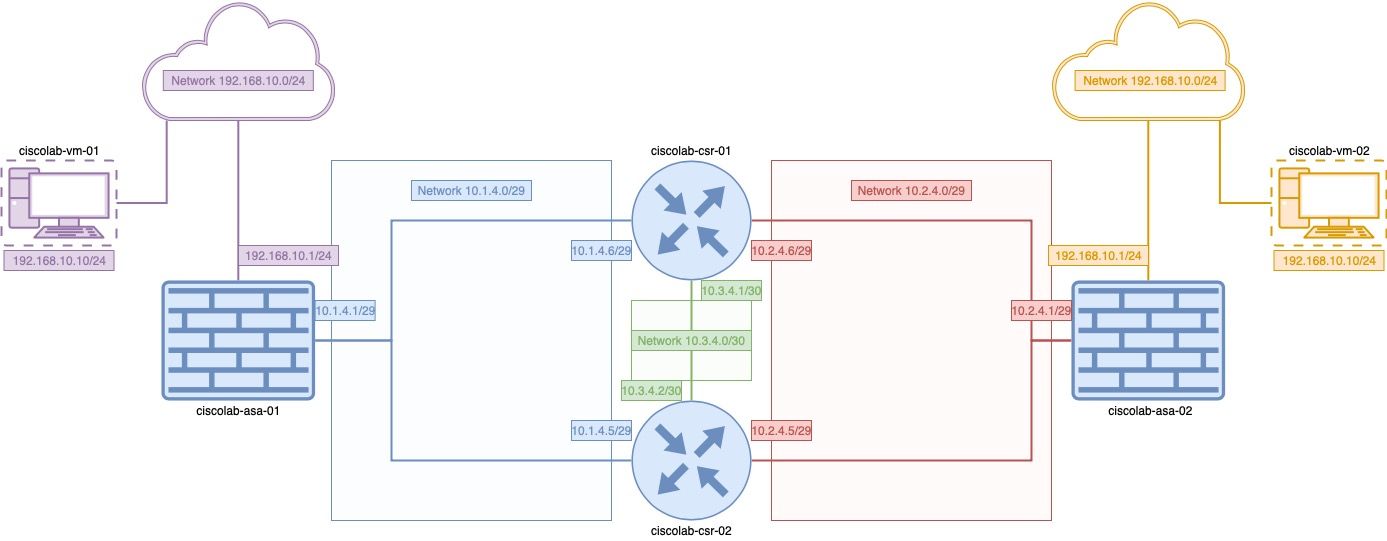
Step-by-step guide #
To create a route-based VPN site-2-site tunnel, follow these steps:
- create a > * create a crypto ipsec proposal:
crypto ipsec ikev2 ipsec-proposal PROPOSAL-ROUTED-VPN
 protocol esp encryption aes-256
 protocol esp integrity sha-384
- create a crypto IPSec profile:
crypto ipsec profile PROFILE-ROUTED-VPN
 set ikev2 ipsec-proposal PROPOSAL-ROUTED-VPN
 set pfs group2
 set security-association lifetime kilobytes 102400000
 set security-association lifetime seconds 28800
- create a group policy:
group-policy GROUP-ROUTED-VPN internal
group-policy GROUP-ROUTED-VPN attributes
 vpn-tunnel-protocol ikev2
- create a tunnel group:
| ciscolab-asa-01 | ciscolab-asa-02 |
|---|---|
| Tunnel Group | Tunnel Group |
! |
! |
interface Tunnel1 |
interface Tunnel1 |
nameif vpn-tunnel |
nameif vpn-tunnel |
ip address 192.168.99.1 255.255.255.0 |
ip address 192.168.99.2 255.255.255.0 |
tunnel source interface inside-1 |
tunnel source interface outside |
tunnel destination 10.2.4.1 |
tunnel destination 10.1.4.1 |
tunnel mode ipsec ipv4 |
tunnel mode ipsec ipv4 |
tunnel protection ipsec profile PROFILE-ROUTED-VPN |
tunnel protection ipsec profile PROFILE-ROUTED-VPN |
! |
! |
IP addresses assigned to the tunnels are non-routable and necessary to bring the tunnel up. Other than that, they do not show up in routing and cannot be accessed.
It is also necessary to create appropriate ACLs on both ASAs to allow traffic from between local networks (192.168.10.0/24 for ciscolab-asa-01 and 192.168.20.0/24 for ciscolab-asa-02):
ACL needed to allow traffic between local networks
access-list vpn-tunnel_access_in extended permit ip any any log interval 10
access-group vpn-tunnel_access_in in interface vpn-tunnel
It is not recommended to have a wide-open ACL such as the one in this example in production environments. It should be limited to necessary traffic only!
Last thing to do is to create routes for remote networks to point to the VPN tunnel:
| ciscolab-asa-01 | ciscolab-asa-02 |
|---|---|
route vpn-tunnel 192.168.20.0 255.255.255.0 10.1.4.5 |
route vpn-tunnel 192.168.10.0 255.255.255.0 10.2.4.5 |
route vpn-tunnel 192.168.20.0 255.255.255.0 10.1.4.6 |
route vpn-tunnel 192.168.10.0 255.255.255.0 10.2.4.6 |
Comments (0)
No comments yet. Be the first to comment.
Leave a comment
Privacy: your name and comment are shown once published. Your e-mail address is never shown or passed on; it is used for the confirmation link and to recognise your later comments, and is deleted when you have no comments left here. Comments that are never confirmed are deleted after 7 days. Confirming sets a cookie in this browser so that it does not ask again.